
Hospital patient room displays
In-room boards for care-team names, daily schedule, and education content — scoped so nothing patient-specific renders without your compliance team's sign-off.
Healthcare digital signage for hospitals, clinic networks, dental chains, and pharmacy groups — lobby wayfinding, waiting room queue and wellness screens, pharmacy now-serving boards, staff comms, and a facility-wide emergency override. One Dashboard, engineered so PHI never lands on a patient-facing screen. Installed nationwide, after-hours, around the clinical calendar.
A static directory and welcome loop can stand alone. Patient queue connections need separate scoping and an anonymous display format.
Fictional brand and sample content. Schedules, prices, and directions are illustrative.The healthcare settings shown below are placement illustrations, not documented customer installations. Content, room names, and any data connections are examples to be scoped for your site.
What is healthcare digital signage?
Healthcare digital signage covers waiting-room information screens, patient education displays, queue management, wayfinding, and pharmacy dispensary boards installed in hospitals, clinics, dental practices, and retail pharmacies. The system must respect HIPAA — no patient names, DOBs, or chart numbers on public screens. CrownTV ships clinical-grade commercial panels with cleanable finishes, software scoped so EHR data never leaves the back of house, role-based Dashboard permissions separating patient-facing from staff-facing content, and SAML SSO for hospital IT. Anonymous queue identifiers handle pharmacy and exam-room signage without exposing PHI.
Three places a screen pulls its weight in a real hospital, with what's on the display and the spec behind it. Same install crew, same Dashboard, same SLA — and the same PHI guardrails on every patient-facing screen.
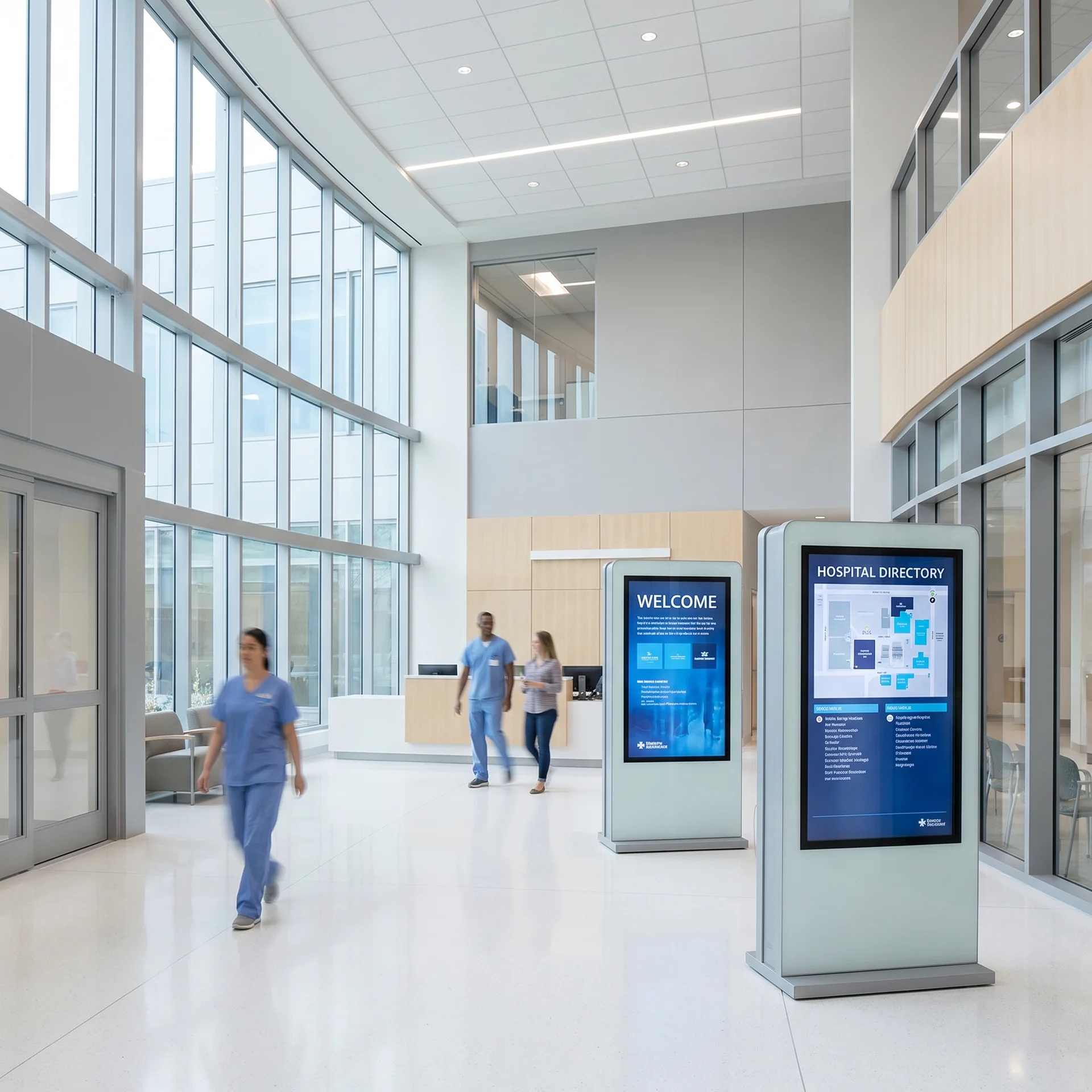
Front door
Visitors arrive disoriented — the lobby screen is the highest-attention display in the building. Digital signage for hospitals starts here: a department directory that stays current as units move, visitor parking and check-in guidance, and wayfinding that cuts lost-visitor calls to the operator.

Highest dwell time
The waiting room is where patient engagement technology earns its keep — average waits run past 90 minutes and a marketing loop makes them feel longer. Waiting room signage that mixes anonymous queue updates, wellness education, and calming content lowers perceived wait and front-desk interruptions.

Dispensary counter
A now-serving board by anonymous queue ID keeps the pharmacy line moving without a single name on screen. Prescription-ready announcements pull from your queue platform via read-only feed; the promo slot flips to flu-shot and immunization messaging on the health calendar.
Also on the same network
In-room boards for care-team names, daily schedule, and education content — scoped so nothing patient-specific renders without your compliance team's sign-off.
Daily menus, allergen flags, hours, and hospital-wide announcements — blood drives, vaccination clinics — above the servery line.
A digital donor wall replaces the engraved plaque that costs a fortune to update — tier giving levels, rotate honorees, recognize new gifts in days.
Smaller-footprint waiting-area and treatment-room screens for dental chains, clinic groups, and medical office buildings.
Break rooms, nurse stations, and staff corridors run their own rotations — census, safety metrics, schedules, recognition — governed by the same Dashboard your comms team already uses for internal communications. Patient-facing and staff-facing content never share a permission scope.
Census, on-call schedules, and shift-change priorities where the care team actually stands — pulled from the systems you already run.
Recognition, benefits deadlines, training reminders, and leadership messaging — the intranet content staff never open, on a screen they pass daily.
Days-since-incident counters, hand-hygiene compliance, and quality scores — visible where the numbers get moved, not buried in a monthly PDF.
Staff-facing rotations live on a separate Dashboard scope from patient-facing content. Nothing back-of-house can land on a public screen.
Code alerts, severe weather, lockdown, evacuation — a single takeover signal from the CrownTV Dashboard, or via API from your emergency notification platform, interrupts every scheduled rotation instantly. Lobby, waiting rooms, pharmacy, cafeteria, staff corridors — facility-wide or campus-wide. The override path is wired during install, not bolted on later.
No line-item surprises between the display quote and the install quote — each package is all-in: hardware, mount, media player, professional install, setup, and the first year of software.
Price it in 30 seconds
$3,450 installed
From our published per-screen prices. Typically installed 5–7 business days after the paid invoice, sooner available.
Email me this estimate
Or call (347) 410-6890. A person replies within 2 business hours.
Real installed budgets
Worked examples built only from our published per-screen prices. Each price covers the commercial display, mount, media player, licensed install and the first year of software. Software after year one is $20/screen/month; installs typically land 5–7 business days after the paid invoice.
2 screens, installed$6,600
Software from year two: $40/month.
7 screens, installed$26,050
Software from year two: $140/month.
20 screensvolume pricing
List-price math before volume pricing.
Per-screen ladder: 32″ $2,950 · 43″ $3,150 · 55″ $3,450 · 65″ $4,550 · 75″ $4,950 · 85″ $5,850 · 98″ $9,950.
HIPAA bars patient identifiers — names, dates of birth, chart numbers — from public-facing screens. Our architecture makes the violation structurally impossible, not just discouraged.
Most healthcare signage projects stall between the software subscription and everything around it — hardware, clinical-environment install, compliance guardrails, and who answers when a waiting-room screen goes dark in month four.
| Dimension | CrownTV | Typical signage vendor |
|---|---|---|
| Scope | Displays + mounts + media players + install + software + support, one contract | Software subscription only — hardware, install, and content are your problem |
| HIPAA discipline | Anonymous queue IDs, patient/staff permission scopes, audit logs, read-only anonymized EHR feeds | Generic CMS with no PHI guardrails — compliance review falls entirely on you |
| Install in a clinical environment | After-hours and weekend installs, infection-control clearances coordinated with facilities | Business-hours install crews with no clinical-environment protocol |
| After go-live | Managed monitoring, response within 2 business hours, 48-hour media-player swaps | Project-based — once screens light up, support is a new ticket queue |
| Accountability | One vendor owns hardware, network, content, and uptime across every site | You coordinate the AV installer, the software vendor, and IT |
Who does what
Most healthcare signage software stops at the dashboard. The clinic still has to buy screens, find an installer, run power and network to each waiting room, and chase warranty claims. Here is the split by provider type.
| Part of the rollout | Software-only platform | Display store or reseller | CrownTV turnkey |
|---|---|---|---|
| Site survey and screen placement plan | Not offered | Not offered | Included |
| Power and network cabling to each screen | Not offered | Not offered | Included |
| Commercial displays rated for 24/7 duty | Not offered | Included | Included |
| High-brightness displays for windows and sunlit spaces | Not offered | Sometimes | Included |
| Wall, ceiling and portrait mounts | Not offered | Sometimes | Included |
| Media player | Sometimes | Sometimes | Included |
| Content management software | Included | Not offered | Included |
| Licensed, insured installation | Not offered | Not offered | Included |
| Content templates and design | Sometimes | Not offered | Included |
| Multi-location rollout project management | Not offered | Not offered | Included |
| Screen monitoring and media-player replacement | Sometimes | Not offered | Included |
| Manufacturer warranty claims coordinated for you | Not offered | Sometimes | Included |
Provider types are general categories; individual vendors vary. CrownTV runs 16,000+ screens for 1,800+ operators and has deployed 10,000+ commercial displays since 2012.
Field guide
Which screen goes where in a clinical building, how a 100-clinic network rolls out without chaos, and the five errors that sink healthcare deployments.
| Placement | What we install | Why |
|---|---|---|
| Waiting rooms | Samsung QM43C–QM55C | 500-nit 4K, rated for 24/7 duty, no consumer menus for visitors to change |
| Queue / wait-time boards | QM43C, landscape or portrait | Crisp text at reading distance; fed from the queue system |
| Wayfinding / directories | QMC portrait, touch optional | Vertical content; touch adds self-service lookup |
| Staff stations / break rooms | QM43C–QM50C | Readable across the room; permissioned staff feed |
| Street-facing / ER wait signs | OM / OH high-brightness series | 2,500–3,000+ nits; standard panels vanish in daylight |
Clinical details that matter: closed, fanless media players where infection control frowns on dust-movers; bezels that tolerate hospital-grade cleaners; and every screen on its own media player so content survives a network hiccup. A frozen “now serving” board is worse than none.
Read-only, anonymized integrations only — we never display PHI on patient-facing screens. Staff-facing rotations live on a separate Dashboard scope.
We never display PHI on patient-facing screens. All EHR-adjacent integrations are read-only, anonymized, and reviewed with your compliance team before go-live.
Trusted by 1,800+ operators in all 50 states since 2012







Real Google reviews from CrownTV deployments — refreshed live.
Read all reviews on GoogleHealthcare signage by city
Same crew network, same Dashboard, same 2-hour quote — pick your metro for healthcare-specific install context.
Cambridge-corridor campuses + Back-Bay corporate, year-round-rated.
Midwest rollouts, winter-rated panels, one project manager.
Mile-High UV-rated signage + Mountain-region rollouts.
Energy-corridor scale + chain-rollout discipline.
Heat-rated outdoor + sun-readable retail across the Valley.
Rain-rated outdoor + corporate-campus signage from Bellevue to Tacoma.
Federal-aware deployments + DMV corporate, Section-508 baseline.
Also available in
Tell us what you're building — all inquiries responded to within 2 business hours.
Frequently asked
Related industries
Same Dashboard, same install crew, same SLA — sharpened for the workflow of every vertical we cover.
Corporate & offices
Lobby brand walls, KPI dashboards, conference status, and recognition.
See corporateSchool digital signage
Campus calendar, dining, residence comms, and emergency overrides.
See educationGym digital signage
Class schedules, member spotlights, trainer reels, and live leaderboards.
See fitnessHospitality
Lobby video walls, conference wayfinding, F&B menus, and spa service menus.
See hospitalityAlso serving: Digital Signage for Retail Digital Signage for Restaurants & QSR Digital Signage for Convenience & gas stations Digital Signage for Salons & spas
All inquiries responded to within 2 business hours.
No commitment. No hard sell.