Restaurant menu board displays

Digital menu boards for restaurants, QSRs, and drive-thru.

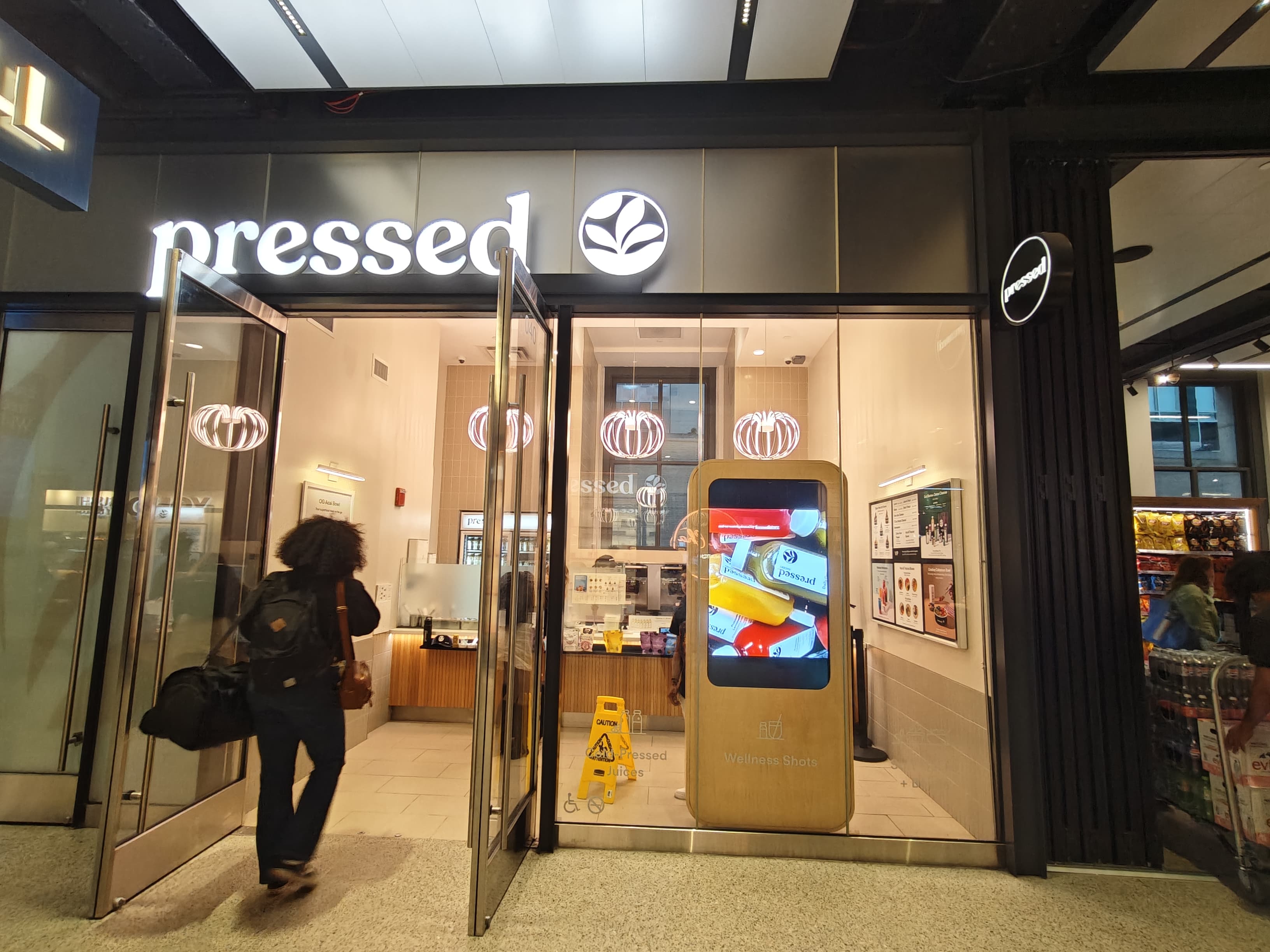
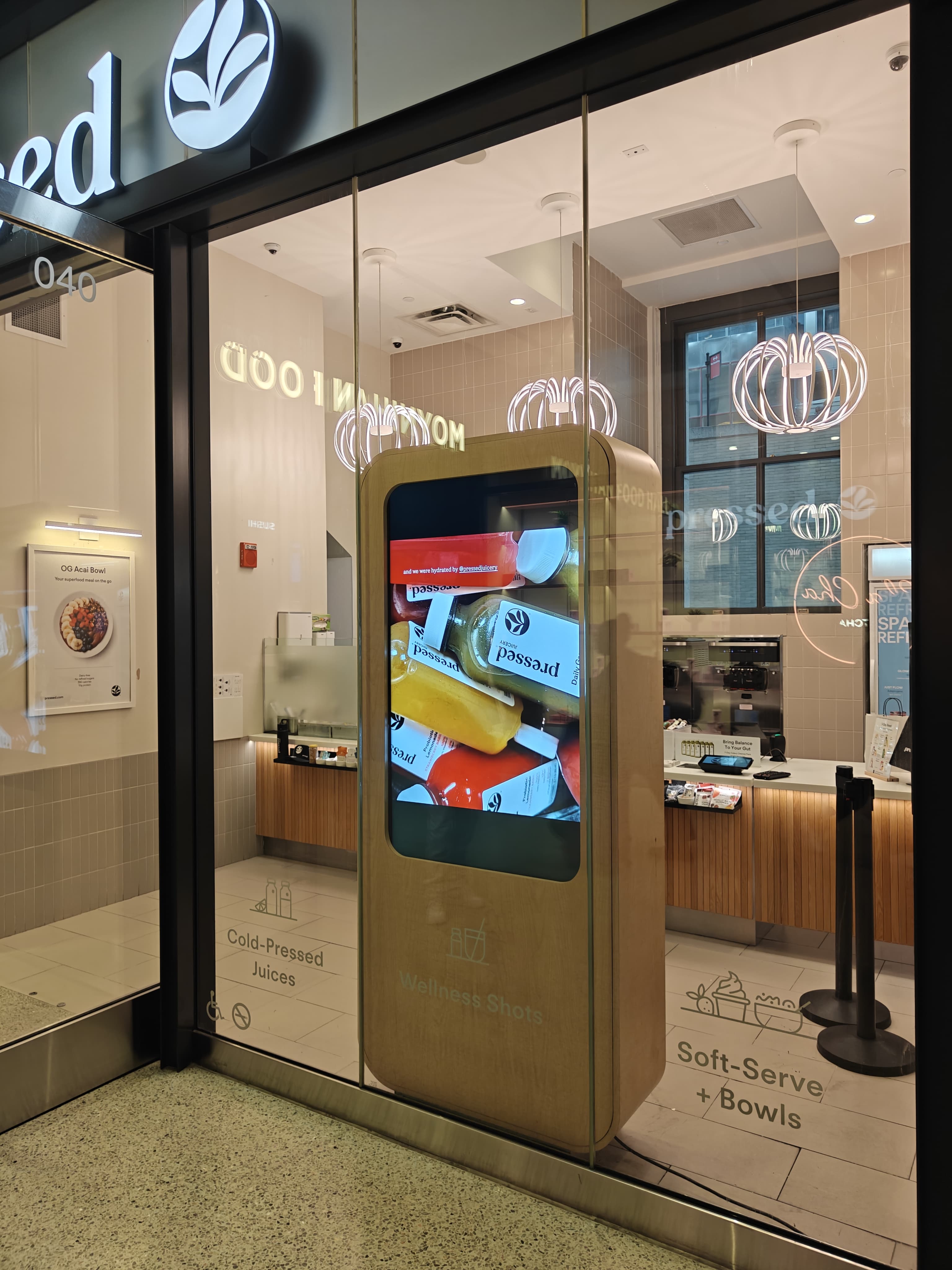
Samsung commercial menu board displays — indoor commercial 4K indoor menu boards at 500 nits for cafés, fast-casual, and counter-service, plus outdoor IP56-sealed drive-thru menu boards at 3,500–4,000 nits in IP56 weather-sealed enclosures. Featured items see a 15–30% sales lift on a digital menu board. Pressed Juicery runs this stack across multiple retail locations. Hello Boba runs it on a food truck. Kaffe runs it in a café. Same one-vendor contract, same nationwide install crew.

In the field

Featured menu items see a 15–30% sales lift on a CrownTV digital menu board.

Trusted by leading brands since 2012

  • L'Occitane logo
  • Victoria's Secret logo
  • Herman Miller logo
  • Pressed Juicery logo
  • Janie and Jack logo
  • TravisMathew logo
  • Cole Haan logo
  • Bonobos logo
  • Invicta logo
  • Lee logo
Authorized partner Samsung Authorized Reseller

Counter-service customers spend 8–10 seconds reading the menu before they order. That window is the highest-impact marketing surface in the entire restaurant — and most chains are still running it on printed posters that take two weeks to update, fade in a month, and carry a literal sticker over last week's price change. Digital menu boards flip the math. Featured items see a 15–30% sales lift when promoted on a digital menu board versus a printed equivalent. Day-parted breakfast → lunch → dinner schedules pull through 10–15% more attach rate on the lunch and dinner combos because the right menu is on the wall at the right time. Price changes ship in seconds, not weeks. Drive-thru menu board displays paired with order-confirmation screens cut reorders by roughly 25% in the QSR operator data we have seen in the field. CrownTV ships the full restaurant menu board displays stack as one contract — Samsung commercial menu board hardware, mounts, media players, dedicated-circuit electrical, FDA Section 4205 calorie-compliant content design, and one CrownTV Dashboard managing every screen across every location. Pressed Juicery runs in-store menu boards and promotional displays across multiple retail locations on this exact stack. Kaffe, the multi-location café, runs counter menu boards with seasonal beverage rotations driven by the CrownTV content team. Hello Boba runs a mobile QSR menu on a food truck, the same high-brightness window-facing hardware we ship into storefront windows. Gourmet Deli, the NYC QSR chain, runs counter menu boards across multiple Manhattan locations. Single-café orders ship in under a week from quote sign-off. Multi-store rollouts are coordinated nationally with one project manager.

Before / after

Update the price in 4 seconds. Not 4 weeks.

A printed menu is a two-week project — design, proof, print, ship, install, hope nobody spilled coffee on it. A digital menu is a keystroke. Pressed Juicery, Kaffe, and Hello Boba edit prices in the morning and watch the new menu land on every screen before lunch.

Before · printed Faded printed menu with crossed-out prices and tape MENU Cold Brew $4.50 $5.25 Oat Latte $5.75 Matcha $6.00 Avocado Toast $8.50
Two-week turnaround. Design, proof, print, ship, install — repeat for every price change.
After · digital Live digital menu board with motion accent MENU · LIVE Cold Brew $5.25 Oat Latte $5.75 Matcha $6.00 Avocado Toast $8.95
Four seconds to push. One dashboard. Every screen. Every location.

Why every QSR and restaurant moves from print to digital menu boards

Three changes that flip the economics the moment the menu is on a screen instead of a poster.

The right menu is on the wall at the right hour

Day-parting auto-switches breakfast, lunch, dinner, and late-night layouts on the kitchen line's actual hours. Lunch combos hit the wall at 11am, dinner combos hit at 5pm, the after-hours menu hits at 10pm. Attach rate on lunch and dinner combos lifts 10–15% versus a static all-day printed menu.

Featured items earn the lift

Featured menu items see a 15–30% sales lift when promoted on a digital menu board versus a static print equivalent. Hero photography, motion accent, and a clear price hierarchy do the work that a poster cannot.

Price changes ship in seconds, not weeks

A printed menu is a two-week project — design, proof, print, ship, install, hope nobody spilled coffee on it. A digital menu update is a keystroke. Pressed Juicery, Kaffe, and Hello Boba edit prices in the morning and watch the new menu land on every screen before lunch.

Printed menu vs. digital menu board

What changes when you replace the print-and-laminate workflow with a Samsung commercial menu board display managed from the CrownTV Dashboard.

Printed menu / consumer TV
CrownTV digital menu board
Two-week turnaround for any price change. Designer, proof, print shop, freight, install — every time.
Update the price in seconds. Push to one screen, every screen in the store, every screen in the chain — all from a browser.
Static layout. Same menu on the wall at 7am as 7pm. Breakfast hash browns next to dinner specials, every hour of the day.
Day-parted breakfast → lunch → dinner → late-night layouts auto-swap on schedule. Lift on lunch and dinner combo attach rate: 10–15%.
Printed posters fade, curl, and collect coffee stains. Reprints every 6–12 months at $300–$2,000 per location per year.
Indoor commercial-grade 16/7 commercial display, 50,000-hour panel life, 3-year warranty. The hardware outlasts five poster reprint cycles.
Featured items get a sticker. Customers tune them out. Sales lift on print promos: marginal.
Hero photography, motion accent, clear price hierarchy. Featured items see a 15–30% sales lift on a digital menu board.
Drive-thru: a backlit fluorescent box with vinyl appliqués. Vinyl warps in the sun, fluorescent tubes blow out, the menu reads as faded by year two.
outdoor IP56-sealed at 3,500–4,000 nits, IP56 sealed enclosure, vandal-resistant housing. Sun-readable through a windshield, rain-rated, cold-rated to -10°F.
FDA Section 4205 calorie compliance is a separate workflow — chain compliance team, separate proof, reprint when a recipe changes.
FDA-compliant calorie counts, allergen icons, and ingredient disclosures designed into every layout. Recipe changes push to every screen instantly.
Different prices per store means a different print run per store. Franchisee gets the wrong menu, sticker over the wrong price.
National default menu in the dashboard with per-store and per-region overrides. Franchisee in San Francisco sees their own pricing automatically.
Sold-out items stay on the menu. Customer orders the special, kitchen says 86, customer walks away.
POS integration (Square, Toast, NCR Aloha, Brink) pushes 86 status to the dashboard. Item shows 'sold out' until it is back in stock.

Restaurant menu board displays we have shipped

Real CrownTV deployments running today. Same Samsung commercial menu board hardware, same CrownTV Dashboard CMS, same nationwide install crew.

Pressed Juicery

In-store digital menu boards and promotional displays across multiple retail locations on the CrownTV stack. Consistent branding nationally, same-day menu updates pushed from one dashboard, franchise-friendly per-store price overrides, seasonal LTOs designed by the CrownTV content team. Pressed Juicery is the multi-location QSR reference build for CrownTV menu board programs.

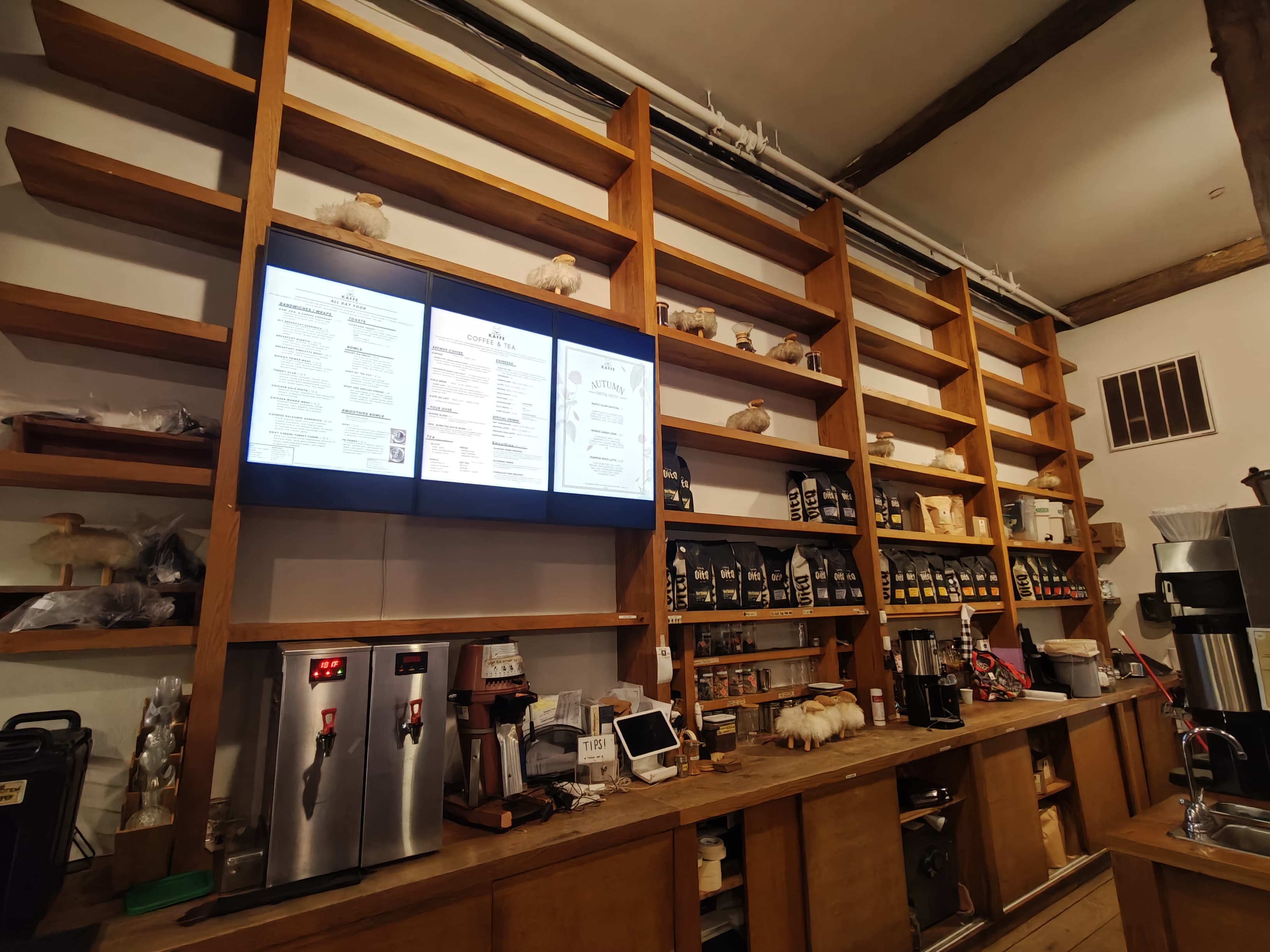
Kaffe

Multi-location café running counter-service indoor menu boards on indoor commercial-grade 55". Day-parted layouts (breakfast, lunch, all-day, espresso bar), seasonal beverage rotations built by the CrownTV content team, price changes pushed from a phone.

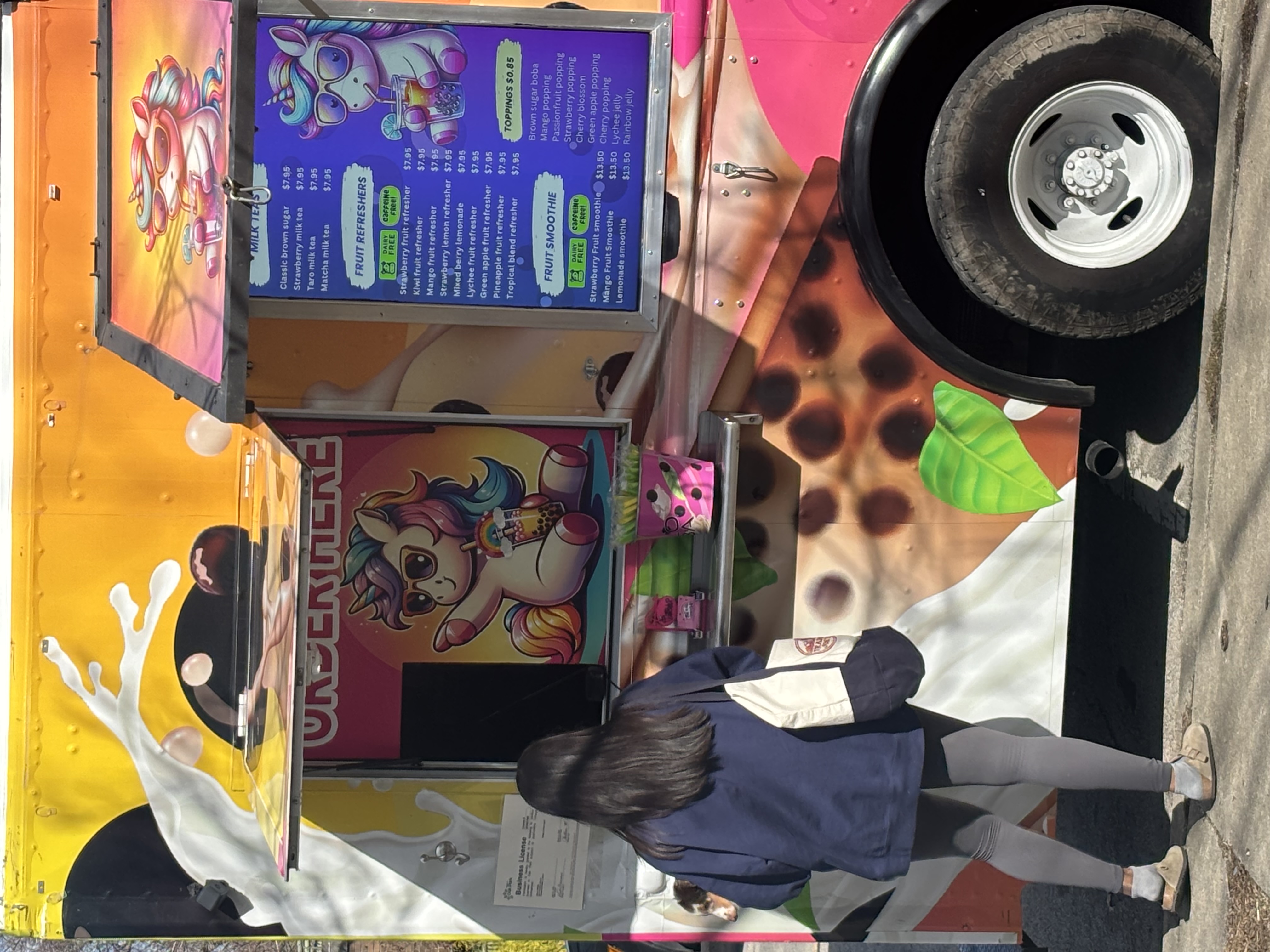
Hello Boba

Mobile QSR food truck running outdoor IP56-sealed digital menu board at 3,500–4,000 nits — IP56 sealed, vibration-tolerant mount, sun-readable. Same high-brightness window-facing hardware CrownTV ships into storefront windows, same dashboard, same nationwide service.

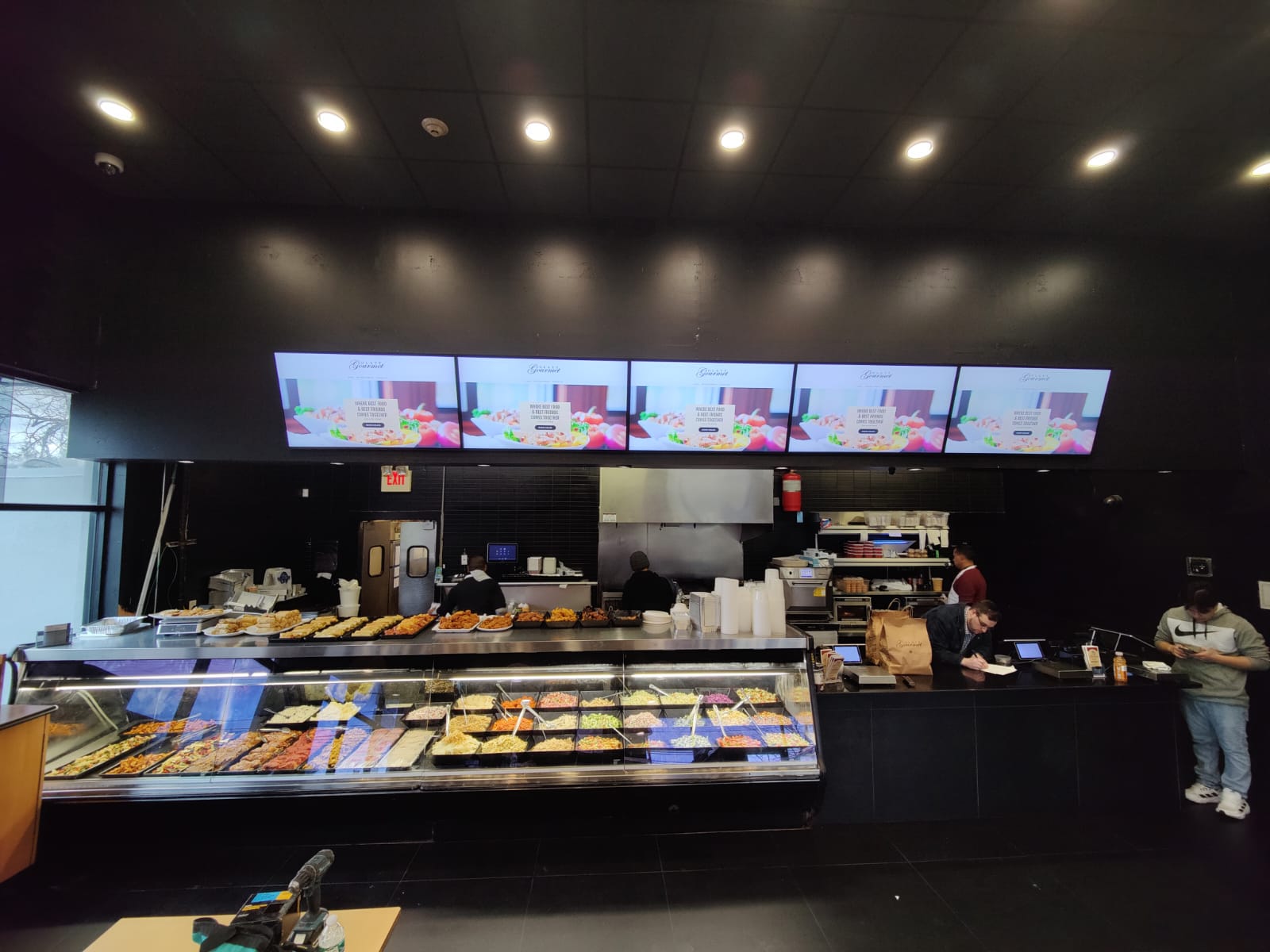
Gourmet Deli

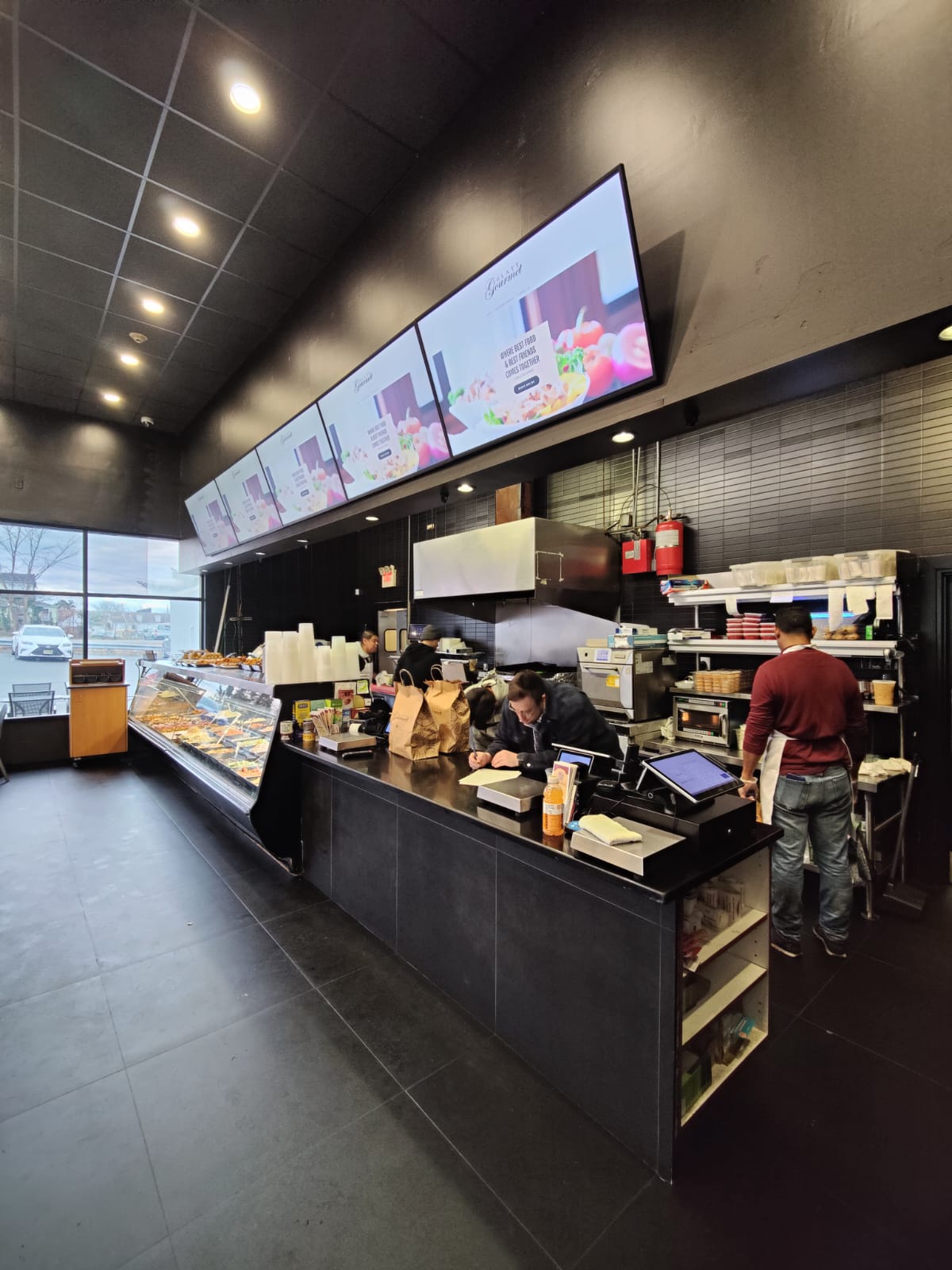
NYC QSR chain running counter-service indoor menu boards across multiple Manhattan locations. Bilingual cycling (English / Spanish), allergen icons, FDA Section 4205 calorie-compliant layouts, daily prep specials swapped each morning from the dashboard.

Match the menu board to the placement

Brightness, duty cycle, and weather-rating depend on where the screen lives. Use this as the first-pass sizing table — the site survey confirms it.

Environment Spec target Recommended panel
Counter-service indoor menu wall (café, QSR, fast-casual) 500 nits / 16/7 duty Indoor commercial-grade 43" / 49" / 55" / 65"
Hotel F&B outlet (lobby bar, breakfast room, café) 500 nits / 16/7 duty Indoor commercial-grade 55" / 65"
Pickup-shelf upsell screen 500 nits / 16/7 duty Indoor commercial-grade 32" / 43"
Drive-thru menu board (QSR exterior) 3,500–4,000 nits / 24/7 outdoor outdoor IP56-sealed 55" / 65"
Drive-thru order-confirmation board 1,500–3,000 nits / 24/7 outdoor outdoor IP56-sealed 32" / 43"
C-store and fuel-food counter 500 nits / 16/7 duty Indoor commercial-grade 43" / 49"
Cafeteria / food-court master directory 500 nits / 16/7 duty Indoor commercial-grade 65" / 75"
Mobile QSR food truck 3,500–4,000 nits / 24/7 outdoor outdoor IP56-sealed 49" / 55"

Digital menu board pricing — installed

Real installed-price ranges from CrownTV menu-board deployments shipped in the last 12 months. Hardware, mount, dedicated-circuit electrical, content commissioning, and one-year CrownTV Dashboard included. Volume pricing kicks in at 5+ units.

indoor commercial 43 / 49 indoor counter menu

$1,500 – $2,800 per unit installed

Indoor commercial-grade 43" or 49" at 500 nits, low-profile flush mount, dedicated 20-amp circuit, content commissioning (3 layouts), 1-year CrownTV Dashboard.

indoor commercial 55 / 65 indoor menu wall

$2,400 – $5,000 per unit installed

Indoor commercial-grade 55" or 65" at 500 nits, heavy-duty mount, dedicated circuit, content commissioning (day-parted layouts), 1-year CrownTV Dashboard.

outdoor IP56-sealed drive-thru menu board

$7,500 – $12,500 per unit installed

outdoor IP56-sealed at 3,500–4,000 nits, IP56 sealed enclosure, weather-sealed conduit, vandal-resistant housing, permitting, dedicated forecourt circuit, content commissioning.

outdoor IP56-sealed + order-confirmation rig

$10,000 – $15,000 per unit installed

Drive-thru menu board paired with order-confirmation display at the speaker. POS integration for live order render-back. Cuts reorders by ~25% in QSR operator data.

Single-café quotes welcome — Hello Boba ships in this range on a one-truck install. Multi-store QSR rollouts custom-quoted with volume hardware pricing and coordinated install schedule. Quote SLA: 4 business hours, Mon–Fri 9am–6pm ET. Standard turnkey deployment is under one week.

Best for

  • Indoor menu board for fast-casual and counter-service restaurants
  • QSR digital menu walls — multi-screen synchronized layouts
  • Drive-thru menu board displays with weather-sealed outdoor housings
  • Order-confirmation screens paired with the drive-thru menu
  • Promo and upsell screens at pickup shelves and beverage stations
  • Café and bakery menu walls with high-quality food photography
  • Hotel F&B outlets — restaurants, cafés, lobby bars
  • C-store and travel-center hot-food and coffee counters
  • Cafeteria, dining hall, and food-court menus
  • Mobile QSR food truck digital menu boards

Hardware we recommend

Indoor menu board: indoor commercial-grade 4K commercial menu board displays at 500 nits, sized 43", 49", 55", 65". Designed for 16/7 commercial duty and 50,000-hour panel life — clarity and brightness consumer TVs cannot match. Drive-thru menu board: outdoor IP56-sealed at 3,500–4,000 nits in IP56 weather-sealed enclosures, rated for direct sun, rain, salt spray, and temperature swings from -10°F to 110°F. CrownTV media player on every screen drives the playlist over HDMI 2.0a. The CrownTV Dashboard CMS manages content across one café or two hundred stores from a browser, with day-parting, FDA calorie compliance, POS integration, and per-location price overrides built in.

See Commercial displays →

Where this is used

Pressed Juicery — multi-location menu boards

Pressed Juicery runs in-store menu boards and promotional displays across multiple retail locations on CrownTV. Consistent branding nationally, same-day menu updates pushed from one dashboard, franchise-friendly per-store price overrides, seasonal LTOs designed by the CrownTV content team.

Hello Boba — mobile QSR food truck menu

Hello Boba runs a outdoor IP56-sealed digital menu board on a mobile food truck — IP56 sealed, vibration-tolerant mount, sun-readable at 3,500–4,000 nits. Same high-brightness window-facing hardware we ship into storefront windows, same CrownTV Dashboard managing the menu, same 4-business-hour quote SLA.

Kaffe — café menu wall with seasonal rotation

Kaffe, the multi-location café, runs counter-service indoor menu boards on indoor commercial-grade 55". Day-parted layouts (breakfast, lunch, all-day, espresso bar), seasonal beverage rotations built by the CrownTV content team, price changes pushed from a phone.

Gourmet Deli — NYC QSR chain

Gourmet Deli runs counter-service indoor menu boards across multiple Manhattan locations. Bilingual cycling (English / Spanish), allergen icons, FDA Section 4205 calorie-compliant layouts, daily prep specials swapped each morning.

Cafés and bakeries — visual storytelling

High-quality images and motion graphics help customers connect with the brand and choose faster. Coffee-shop and bakery menu walls show products authentically — far better than printed posters that fade, curl, and have to be reprinted every time the espresso roast changes.

QSR chains — nationwide rollouts

Whether you are running one café or two hundred QSR locations, CrownTV provides dependable installation across the U.S. — site surveys, mounting, on-site configuration, and post-launch managed service all handled. One project manager from quote to commissioning. Standard turnkey deployment is under one week.

Hotel F&B outlets

Hospitality groups run digital menu boards across in-property restaurants, cafés, and lobby bars from one CrownTV Dashboard with branded templates, day-parted menus, and bilingual or trilingual cycling for international clientele in airport hotels and tourist-corridor properties.

C-store and fuel food service

Travel-center and convenience-store hot-food and coffee counters run digital menu boards that update with daily specials, seasonal LTOs, and dynamic pricing in seconds. Pair with the storefront forecourt display program for a unified front-of-store digital footprint.

Drive-thru menu boards

outdoor IP56-sealed outdoor digital menu boards at 3,500–4,000 nits in IP56 weather-sealed enclosures. Vandal-resistant housings, dedicated forecourt circuits, permitting handled per municipality. Pair with order-confirmation displays for the complete QSR drive-thru build — the customer sees the order rendered back as it is keyed at the speaker, and reorders drop by roughly 25%.

The day reads like a clock

Schedule once. The menu changes itself for the rest of the year.

Day-parting is the single most under-used feature in digital menu boards. Build the breakfast / lunch / happy-hour / dinner zones once, point them at hours of the day, and the menu rotates automatically without anyone touching the dashboard again.

Day-parting · the clock as a content schedule
A 24-hour day-parting clock for digital menu boards Four arcs split a 24-hour clock into breakfast, lunch, happy hour, and dinner menus, each labeled with hours and a representative item. DINNER HAPPY LUNCH BREAKFAST 0:006:0012:0018:00 NOW SHOWING 12:30 PM LUNCH · LIVE Combo · soup + sandwich $13.50 Cobb salad $14.95 Grain bowl · seasonal $15.25 Cold brew · 16oz $5.25 UP NEXT · 4:00 PM Happy hour menu draft beer · $2 off all wells SCHEDULE ONCE · LANDS EVERY MORNING · ZERO STAFF TIME

What to actually run on these screens

Patterns that work in production — built and shipped on real CrownTV deployments.

Breakfast → lunch → dinner with automatic crossover

Breakfast 6–11am, lunch 11–2, all-day 2–5, dinner 5–close. Items, prices, and photos swap on schedule with no staff involvement. Most QSR chains see a 10–15% lift in attach rate when the lunch combo replaces the breakfast layout the moment the kitchen flips.

Limited-time offer takeover with a countdown

Holiday LTOs (pumpkin spice, peppermint mocha, summer refresher) take a top slot for the campaign window with a soft countdown — 'last day' badge appears on the final morning automatically.

Allergen and FDA Section 4205 calorie compliance

Calorie counts on every item, allergen icons on the items that need them, ingredient deck available via QR. We design FDA-compliant menu layouts so chains over 20 locations can ship to spec without a separate compliance pass.

Drive-thru order-confirmation board paired with the menu

The customer sees the order rendered back as it's keyed at the speaker. Cuts reorders and re-pulls by ~25% according to QSR operator data we've seen in the field.

Beverage-station upsell loop

60-second loop on the screen above the pickup shelf — espresso pairings, a featured pastry, the loyalty-program join QR. Captures the customer in the 90 seconds they're standing still.

Different prices per location, edited once

National default menu, override prices per store or per region in the dashboard. Franchisee in San Francisco sees their own pricing; corporate keeps oversight. Pressed Juicery runs this pattern across multiple retail locations.

Sold-out badges driven from POS or kitchen

Square, Toast, NCR Aloha, and Brink integrations push '86' status to the dashboard. The item shows 'Sold out' until it's back in stock — no customer disappointment at the counter.

Dynamic happy-hour ladder

4–5pm is $2 off wells; 5–6pm is $4 off bottles. The ladder auto-advances by the hour. Bars and lobby F&B outlets running this see the pre-dinner crowd lean in instead of leaving.

Bilingual or trilingual menu cycling

English / Spanish / Mandarin layouts cycle on a per-screen schedule or by the segment of the day. Hospitality groups with international clientele run this in airport hotels and tourist-corridor restaurants.

Cafeteria and food-court menu walls

Multi-vendor food courts run a master directory plus per-vendor menu screens, all on one dashboard with vendor-scoped editing rights. Schools and corporate dining run this across the cafeteria.

Install + operational rules we ship by

Field-tested specs from thousands of CrownTV installs. The rules that keep the screens running and the content readable.

Indoor menu boards run indoor commercial-grade at 500 nits

Counter-service QSR doesn't need 3,000-nit window panels. indoor commercial-grade at 500 nits handles every front-of-house menu environment from cafés to fast casual. Save the high-brightness window-facing budget for the drive-thru and storefront.

Drive-thru runs outdoor IP56-sealed at 4,000 nits in a weather-sealed enclosure

Drive-thru menu boards see direct sun and direct rain. We ship outdoor IP56-sealed in an IP-rated enclosure with active cooling. The screen survives a Phoenix August and a Buffalo February without an enclosure swap.

Mount height: top of the menu at 7'6" off the floor for landscape, eye-level for portrait

Counter-service customers read at a slight upward angle. Top of the menu board at 7'6" puts the most-ordered items in the natural eye line. Portrait menus at end-caps come down to 5'8" centerline.

Three to seven items per board, max

Customers spend 8–10 seconds picking. A 14-item menu wall reads as overwhelming and shifts pick-rates toward the easy default. Split into themed boards — entrées, drinks, sides — instead of cramming.

Photo or no photo, never half-and-half

Either every item has a photo or none do. Mixed photography reads as 'we ran out of budget' and pulls focus to the items that have images at the expense of the rest of the menu.

Refresh cadence: minimum twice a year, ideally seasonally

Even a static menu board benefits from a seasonal refresh — winter palette, summer palette, fall LTO band. The infrastructure makes the refresh free; the only cost is the design hour.

What CrownTV ships on a digital menu boards scope

Digital menu boards are the highest-volume QSR scope CrownTV ships. Pressed Juicery runs in-store menu boards across multiple retail locations on this exact stack. Hello Boba runs the same stack on a mobile QSR truck. Single-café orders ship in under a week.

Hardware

Indoor commercial-grade 4K commercial panels for indoor menu walls — 43″, 49″, 55″, 65″ are the four most-shipped sizes. Drive-thru and outdoor pickup windows run outdoor IP56-sealed at 4,000 nits in IP-rated enclosures. The CrownTV media player on every screen, dual-display capable for paired menu + order-confirmation rigs.

Install scope

Site survey including a kitchen-line and counter measurement. Mount specification (low-profile flush for indoor, articulating for paired counter+drive-thru, IP-rated pylon for outdoor). Electrical including dedicated circuits for drive-thru pylons. POS integration where the customer wants live availability — we've integrated with Square, Toast, NCR Aloha, Brink, and a handful of proprietary chain stacks. Permitting and COIs handled in-house.

Content design

FDA Section 4205 calorie-compliant templates. Day-parted layouts (breakfast / lunch / dinner / late-night). LTO and seasonal campaign drops. Bilingual and trilingual cycling on request. Custom motion graphics for hero items and combo features at flat hourly rate. We do not subcontract design — every menu is built in-house by CrownTV's content team.

Managed service

Offline alerts in under five minutes. Menu push validation — when the operator pushes a price change, the dashboard verifies every screen received the asset before clearing the change as live. Hardware swap in 5 business days under warranty. Phone support from a CrownTV operator, 24/7.

Digital menu boards: how to spec them, what to run, and what they actually cost

A digital menu board is the most-watched piece of signage in any restaurant. Counter-service customers spend 8–10 seconds reading the menu before they order. That window is the highest-impact marketing surface in the operation — and for most chains, it's still being run on printed posters that take two weeks to update and fade in a month.

The economics flip when the menu is digital. Featured menu items see a 15–30% sales lift when promoted on a digital menu board versus a static print equivalent. Day-parted layouts that auto-switch breakfast, lunch, and dinner pull through 10–15% more attach rate on the lunch and dinner combos. Price changes ship in seconds, not weeks. The infrastructure pays itself back inside the first calendar year for most QSR operators.

What hardware actually belongs on a menu wall

Indoor counter-service menu boards run indoor commercial-grade at 500 nits — the same commercial-grade CrownTV ships into retail and corporate. The 43″, 49″, 55″, and 65″ are the four most-shipped sizes for QSR; cafés and bakeries usually run 50″ or 55″ landscape behind the counter. Multi-screen menu walls — three, four, or five panels in a row — sync via the CrownTV Dashboard so a single hero campaign can span the whole wall or each panel can show its own category.

Drive-thru menu boards are a different scope. The panel sees direct sun, direct rain, ambient swings from -10°F to 110°F depending on the market, and a stiff requirement for 4,000+ nits to be read through a windshield in the afternoon. outdoor IP56-sealed in an IP-rated enclosure is the install. Pair it with an order-confirmation screen at the speaker for the full drive-thru experience — the customer sees the order rendered back as it's keyed, and reorders drop by roughly 25% in the operator data we've seen in the field.

What we've shipped: Pressed Juicery, Kaffe, Hello Boba, Gourmet Deli

Pressed Juicery runs in-store menu boards and promotional displays across multiple retail locations on the CrownTV stack. Consistent branding, same-day menu updates, and franchise-friendly per-store pricing — all from one dashboard. Kaffe, the multi-location café, runs counter menu boards with seasonal beverage rotations driven by the CrownTV content team. Hello Boba runs a mobile QSR menu on a food truck — the panel handles the vibration, the sun, and the rain spray on the same high-brightness window-facing hardware we ship into storefront windows. Gourmet Deli, the NYC QSR chain, runs counter menu boards across multiple Manhattan locations.

Pricing a digital menu board program

Hardware: indoor commercial-grade 43″ ≈ $700, 55″ ≈ $1,200, 65″ ≈ $1,700. outdoor IP56-sealed for drive-thru runs ≈ 1.6–2× the QM equivalent, plus the IP-rated enclosure. CrownTV media player and software subscription are flat per screen. Turnkey install is flat per screen for single-location and discounts on multi-location rollouts; full pricing is on the pricing page. A typical four-screen counter menu wall ships under a week from order to live.

Day-parting alone justifies the upgrade

The single highest-ROI feature in digital menu boards is day-parting. Build a breakfast layout, a lunch layout, a dinner layout, and an after-hours layout once. Schedule the dashboard to swap them on the kitchen line's actual hours of operation. The menu changes itself for the rest of the year. Customers see the right menu at the right time, the wrong items don't waste menu real estate, and the operator's marketing team gets to work on the campaigns that actually move sales instead of trafficking print proofs.

Read more on digital menu boards, menu-board pricing, and the software side of running them.

POS integrations: live availability, sold-out badges, and price sync

The single biggest operational frustration in a printed menu environment is the gap between what the kitchen can make and what the menu shows. The salmon is 86'd at 11:30, but the menu still shows it through the lunch rush, and the cashier explains the problem to every fourth customer. The fix is a POS integration that pushes "86" status to the dashboard so the menu board reflects reality.

CrownTV integrates with Square, Toast, NCR Aloha, Brink, Lightspeed, and Clover for live menu sync. The integration runs on a 30-second poll — when an item is marked unavailable in the POS, the menu board grays it out within a minute. When prices change in the POS, the menu reflects the new price on the next push. The cashier and the customer see the same menu. Reorders drop, cashier-to-customer friction drops, and the operator stops paying staff time to explain a menu the screen could explain itself.

FDA Section 4205 calorie compliance, built into every template

FDA Section 4205 requires chains with 20+ locations to display calorie counts on every menu item, plus allergen and ingredient information available on request. CrownTV's menu-board templates are built FDA-compliant by default — calorie counts in the right typographic hierarchy, allergen icons on the items that need them, an ingredient deck accessible via QR. We've shipped this template into multi-state QSR chains and into hospitality groups operating across compliance-required jurisdictions. The compliance pass is the template's job, not the operator's.

For local and single-store operators below the 20-location compliance threshold, calorie display is optional but increasingly expected — many states and cities have local ordinances that require it regardless of chain size. The template handles either case; the operator toggles compliance mode in the dashboard if it's required, leaves it off if it isn't.

Custom quote

Every project is custom-quoted.

Tell us what you're building — all inquiries responded to within 4 business hours.

Digital menu boards — FAQ

What are digital menu boards?
Commercial-grade Samsung commercial menu board displays that show your restaurant's menu, prices, food photography, and promotions. They replace printed menus and let you update content instantly from the CrownTV Dashboard CMS — single café or 200-store QSR chain, same dashboard.
How do digital menu boards help restaurants increase sales?
Featured items see a 15–30% sales lift when promoted on a digital menu board. Day-parting (auto-switching breakfast, lunch, dinner menus) lifts attach rate on lunch and dinner combos by 10–15% because the right menu is on the wall at the right time. Drive-thru order-confirmation screens cut reorders by roughly 25% in QSR operator data.
How much does a digital menu board cost?
Indoor menu boards: $1,500–$5,000 per unit installed (indoor commercial-grade 43"–65", mount, dedicated circuit, content commissioning, 1-year CrownTV Dashboard). Drive-thru menu boards: $7,500–$15,000 per unit installed (outdoor IP56-sealed at 3,500–4,000 nits, IP56 enclosure, weather-sealed cabling, vandal-resistant housing, permitting). Volume pricing on 5+ units. Quote SLA: 4 business hours, Mon–Fri 9am–6pm ET.
Can I update menu items remotely?
Yes. Change items, prices, and photos instantly from the CrownTV Dashboard — from your phone or laptop. Push updates to one screen or every screen across every location, with day-parted scheduling and per-store price overrides built in.
Do digital menu boards support breakfast, lunch, and dinner schedules?
Yes. Day-parting is built into the dashboard. Schedule breakfast, lunch, dinner, late-night, and happy-hour layouts to swap automatically on the kitchen line's actual hours. No staff involvement, no manual swap, no risk of the wrong menu being on the wall.
What's the difference between digital menu boards and regular TVs?
Samsung commercial menu board displays are designed for 16/7 commercial duty (indoor commercial) or 24/7 outdoor (outdoor IP56-sealed), with a 50,000-hour panel life rating and a 3-year Samsung commercial warranty. Consumer TVs run hot, wash out under restaurant lighting, are not built to operate 14+ hours daily, and typically void their warranty the moment they run commercially. The reliability gap is the entire reason commercial menu board displays exist as a separate SKU.
Can digital menu boards be used in drive-thrus?
Yes. CrownTV ships outdoor IP56-sealed outdoor digital menu boards at 3,500–4,000 nits in IP56 weather-sealed enclosures — rated against direct sun, rain, salt spray, dust ingress, and high-pressure water jets. Vandal-resistant housings, dedicated forecourt circuits, permitting handled per municipality. Pair the drive-thru menu board with an order-confirmation display at the speaker for the complete QSR drive-thru build.
Does CrownTV install menu boards nationwide?
Yes. Whether you are running one café or 200 QSR locations, CrownTV provides nationwide installation across all 50 U.S. states. Site surveys, mounting, dedicated-circuit electrical, on-site configuration, and post-launch managed service are all handled. Standard turnkey deployment is under one week. One project manager from quote to commissioning.
What hardware do I need for digital menu boards?
A Samsung commercial menu board display (indoor commercial for indoor, outdoor IP56-sealed for drive-thru), a CrownTV media player, an engineered mount, dedicated 20-amp circuit, and a CrownTV Dashboard subscription. CrownTV provides every line item as one turnkey contract — no separate vendors to coordinate, no second integrator, no second invoice.
Are digital menu boards worth it for small restaurants?
Yes. A single café cuts ongoing printing costs (most operators spend $500–$2,000/year on printed menus), eliminates last-minute price-sticker fixes, and presents a more polished customer experience. Single-location quotes are common — response within 4 business hours. Hello Boba runs the same stack on a single mobile food truck.
Can different locations show different prices?
Yes. Set a national default menu in the dashboard and override prices per store or per region. Franchisees can edit through scoped dashboard permissions while corporate keeps final say. Pressed Juicery runs this pattern across multiple retail locations.
Do you handle FDA Section 4205 calorie compliance?
Yes. Our content team designs FDA Section 4205-compliant menu layouts with calorie counts on every standard item, allergen icons, ingredient disclosures, and the variation language required for chains over 20 locations. Same dashboard pushes calorie-updated content to every screen when a recipe changes.
How fast is a menu update?
Seconds to push. Updates land on every screen instantly, or on the schedule you set. The dashboard verifies every screen received the asset before clearing the change as live, so you know the new price is on the wall before a customer ever sees it.
What POS systems do you integrate with for live menu data?
Square, Toast, NCR Aloha, and Brink are the four most-shipped POS integrations. Sold-out / 86 status pushes from the kitchen to the dashboard automatically, so the item shows as 'sold out' until it is back in stock. Custom POS integrations are scoped per project — most modern POS platforms with a webhook or REST API are supported.
What's the lead time on a digital menu board install?
Standard commercial panels ship in 5–7 business days. outdoor IP56-sealed outdoor enclosures may take 2–3 weeks. Single-café orders typically go from quote sign-off to live in under a week. Multi-store QSR rollouts are coordinated against the operator's franchise opening or remodel schedule.

Quote in 4 business hours

Tell us where the digital menu boards go. We'll spec the panel.

Single café or a 200-store QSR rollout — every quote includes hardware, mount, dedicated-circuit electrical, content commissioning, and one year of CrownTV Dashboard. Same project manager from quote to commissioning. Standard turnkey deployment is under one week.

  • Samsung Authorized Reseller pricing on indoor, window-facing, and outdoor commercial panels.
  • Licensed electricians and nationwide install crew in 50 states.
  • FDA Section 4205 calorie compliance built into menu templates.

Response in 4 business hours

Get a quote

Tell us a few details and we'll come back with a fixed installed price.

All inquiries responded to within 4 business hours.

Ready when you are

Ready to spec digital menu boards?

All inquiries responded to within 4 business hours.

No commitment. No hard sell.